About Interlock Function |
|
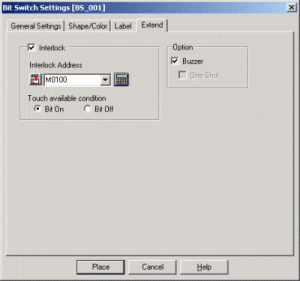
Interlock is the function with which you can prevent from miss-input, and you can input the data only when the Bit is ON or OFF.
This function can be set on the parts and tags relating to input such as Switch or Keypad. |
| |
|
About the limit of Interlock Function |
| |
Depending on the versions or types of the Screen Creation Software which you use, there are some differences of Setting Contents of Interlock Function.
|
| |
GP-PRO/PB III |
Setting Contents |
Over V4.0 |
| - |
[Touch Enable Condition] can be set when setting Interlock Address. |
| - |
It's possible to set not only on Parts but also on Tags. |
| - |
GP77 series, GP77R series and GP2000 series are available |
| - |
[Bit OFF] from [ Touch Enable Condition] can not be set with GP70 series. |
|
V2.0~V3.0 |
| - |
Only Interlock Address can be set. |
| - |
[Touch Enable Condition] can not be set. Only when Interlock Address is ON, Input can be accepted. |
| - |
It's possible to set on Parts, impossible on Tags. |
|
|









 Return to Top
 Close
Close