| How to use |
|
|
|
|
|
| Having Troubles? |
|
|
| Careful! |
| When browsing the Internet Explorer downloaded Window® XP Service Pack 2 or later, please be sure to allow the liked contents (PDF files) displayed. Click the message on the Information Bar, then select [Download File]. For the details, please refer to Window® XP’s Security feature. |
|
 |
| |
| How to Use This Manual |
| |
| Structure of the Manual |
| |
This "GP-Pro EX Reference Manual" is the first of two manuals for this product and explains how to use the "GP-Pro EX" software. Please refer to both of the manuals named below when using this product.
In addition to these manuals, data files containing supplemental information on updated functions are also provided.
To read these additional data files, click on the [Start] button in your Windows OS main screen and select the [Programs]››[Pro-face]››[GP-Pro EX] menu. Then, click on the [Read Me] selection.
Further, for detailed explanations of the GP, please refer to the "User Manual".
|
| |
| Vol.1 Reference Manual |
Describes GP-Pro EX's operation procedures and details
on all features. It contains HTML and PDF data. |
| Vol. 2 Device/PLC
Connection Manual |
Describes the methods for connecting the GP to supported
devices/PLCs from other manufacturers. Provided
as HTML and PDF data. |
|
|
| How to Use the Reference Manual |
| |
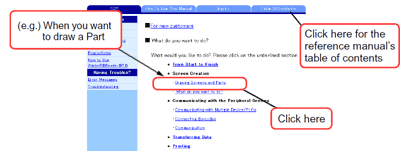
- Search for what you want to do
Select "What you want to do" from the top page of the reference manual.
Click the topic and the explanation for that function will appear.
- Look at the image to see what sort of things you can do
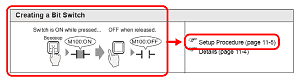
Click the chapter's "Settings Menu". You are looking at which functions you can do and the
illustrations associated with that function. Click the "Setup Procedure" on the right of the image
you want to select. You can create the part following the easy-to-understand procedure.
- Look at the settings guide
A "Settings Guide" is prepared for each chapter. It explains the settings in GP-Pro EX.
|
|
|



