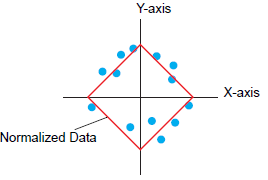
Values of two Word devices are collected and points and lines are displayed in a graph as x-axis/y-axis coordinates.
You can display normalized data and compare it with actual data.

Use the Sampling function to get data. To display a historical trend graph, you first need to set up device/PLC data to be collected in the display unit using the sampling function. 24.3 Sampling Data at Constant Intervals
24.4 Sampling Data at Specific Periods

Please refer to the following for models compatible with XY Historical Scatter Graphs.1.3 Supported Features
Normalized data can be set in XY Historical Scatter Graph.
XY Historical Scatter Graph shows the values of collected sampling data in x-axis/y-axis coordinates.
18.8.1 Procedure - Place Normalized Data on a Graph for Comparison with Actual Data