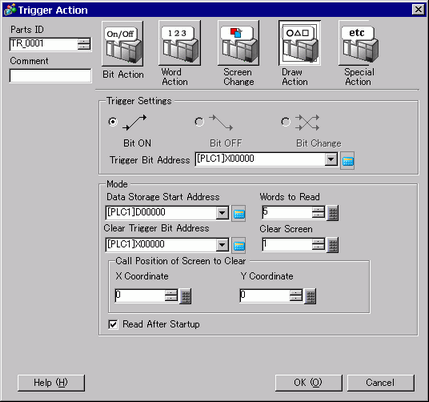
When the trigger bit address turns ON, drawing action is executed.
Trigger Settings
Bit ON
Executes the action designated in [Mode] when the [Trigger Bit Address] changes from OFF→ON.
Trigger Bit Address
Select the bit address that triggers the drawing of the image.

When the image displays, this turns OFF.
Please maintain graphical data while drawing.
Mode
Data Storage Start Address
Stores the image and properties as graphical data in a Word address.
Set this Word address' start address.
Words to Read
Specify the draw data words from 5 to 7.
Clear Trigger Bit Address
Set a trigger bit to clear the drawn image. When the clearing bit turns ON, a Clearing Screen will overwrite the displayed screen.
When the Clearing Screen appears, this turns OFF.
Clear Screen
Designate a Base screen to clear the drawn image.
A Clearing Screen must first exist in the project.
Call Position of Screen to Clear
Designate the Clearing Screen's call position using an X coordinate and a Y coordinate.
The top-left of the screen becomes coordinate (0, 0).
Read After Startup
Reads the draw data when the conditions in [Trigger Settings] are satisfied.
This action cannot be used when the [Data Storage Word Address] is an internal device.
