
When the [Register Start Screen] is not used, a message is displayed by the operating system.
The startup screen orientation is based on the display unit orientation.
When using GP-4100 series, you can set up a screen that displays when the display unit is starting up until touch operations are available.
When the [Register Start Screen] is not used, a message is displayed by the operating system.
The startup screen orientation is based on the display unit orientation.
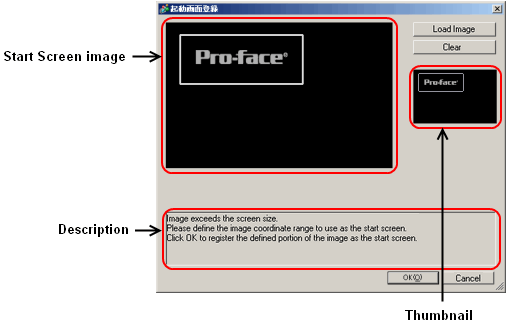
Start screen image preview
Displays the defined image with the actual image size.
If the selected image is larger than the display unit's screen size, a frame showing the maximum screen size appears on the image. Drag the frame to select the portion of the image you want to use as the start screen.
Load Image
Loads the image you want to display at start up.
You can select BMP, JPEG, DPD, or PNG files.
Clear
Erases the start screen image.
Start screen full image preview
If the selected image is larger than can be displayed in the Start screen image preview, a preview of the full image is available here.
Help area
Provides assistance on using the start screen.