
Please refer to the "Hardware Manual" of each display unit regarding COM ports installed on the display unit being used and supported modes.
The MPI port is not included in the check.
Check the send and receive lines for RS-232C, RS-422 and network communication. Use this check when an error occurs.
To check COM1 or COM2, you need to connect a loopback cable.
Please refer to the "Hardware Manual" of each display unit regarding COM ports installed on the display unit being used and supported modes.
The MPI port is not included in the check.
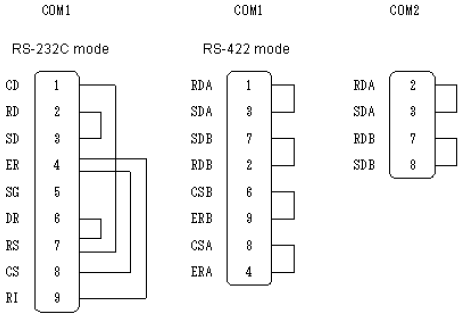
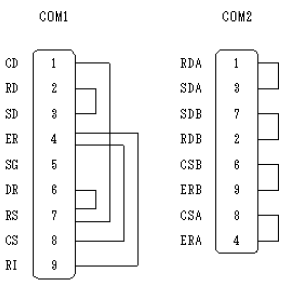
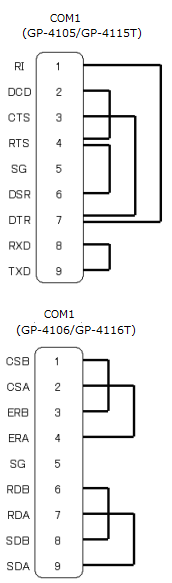
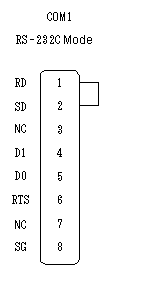
You need to prepare a loopback cable to check COM1/COM2/LAN.
There are four patterns to wire the loopback cable, which differ depending on the display unit.
Display Unit |
Loopback Cable Types |
|---|---|
GP3000 Series (except for GP-3302B) |
|
GP-3302B GP-4200 Series (except for GP-4203T) GP-4300 Series GP-4400 Series GP-4500 Series (except for the GP-4503T MPI port) GP-4600 Series (except for the GP-4603T MPI port) ST3200 Series (except for AST-3211A MPI port) ST3300 Series (except for AST-3302B MPI port) ST3400 Series ST3500 Series |
|
GP-4100 Series (except for GP-4107) |
|
LT4000 Series |
|
SP5000 Series Power Box(SP-5B10) |
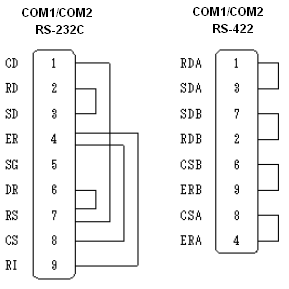
Check
Connect the loopback cable to one of the interfaces and check the operation. When the operation is acceptable, [OK] is displayed. When there is a problem, [NG] is displayed.
For details about the setting screen, refer to the setting guide.
 M.17.6.5 Maintenance Menu - Check COM1/COM2/LAN
Go to offline mode and touch [Maintenance Menu] on the item changeover switch.
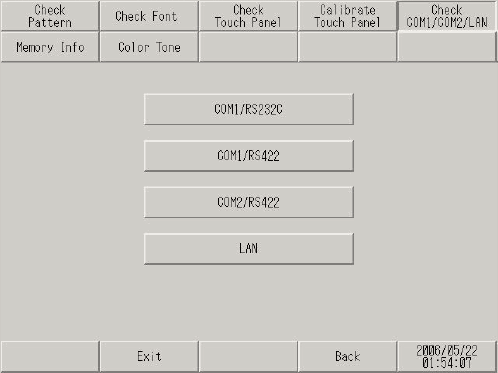
When the [Maintenance Menu] screen opens, touch [Check COM1/COM2/LAN].
When using GP-4100 Series (Monochrome Model), touch the [Check COM] or [Check LAN] button and go to step 4.
From the [Check COM1/COM2/LAN] screen, select the interface to check. (Example, COM1/RS232C)
As prompted by the displayed message, touch [Start].
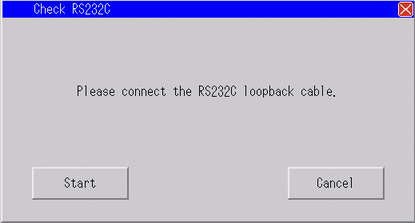
When there is no problem, displays [OK]. When an error occurs, displays [NG]. Touch [Close] to end the check.