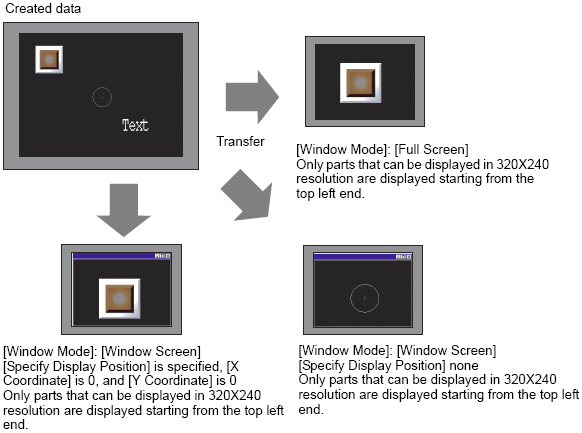
You can transfer data to a model that has different screen resolutions (screen size) but the data will not be displayed properly if it has a lower resolution.
Example 1)
Create IPC screen size (800x600) and transfer to IPC 320x240
Example 2)
Create IPC screen size (800x600) and transfer to IPC 1600x1200
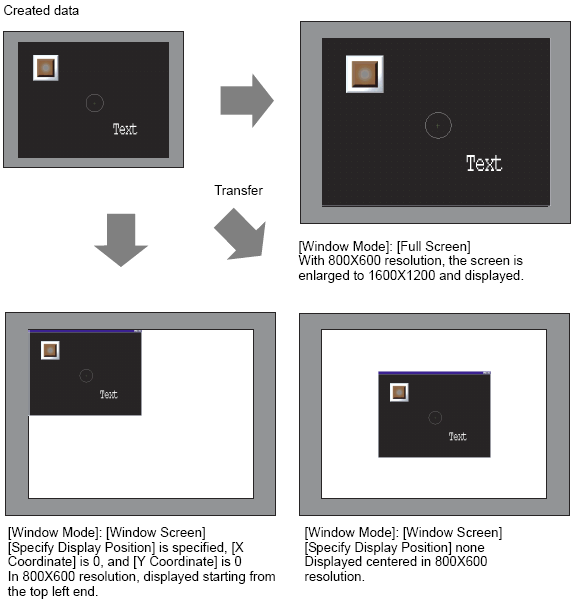
When viewing screen data on a large sized screen with a high resolution, a portion of the window frame will appear outside the screen.
To make sure the window is not outside the screen, do not display the window title bar, window frame, and menu bar, or display in full-screen mode. Be aware that when you do not display the title bar or display in full-screen mode, the title bar's Exit button does not display.
Available from the [System Settings] window's [Display Unit] in the [WinGP Settings] tab, the [Display Settings] do not change when you change IPC models. However, regardless of the IPC you are converting to, the [Specify Display Position] X and Y coordinates are initialized to 0 and the [Window Size] is initialized to XGA (1024x768) dimensions.