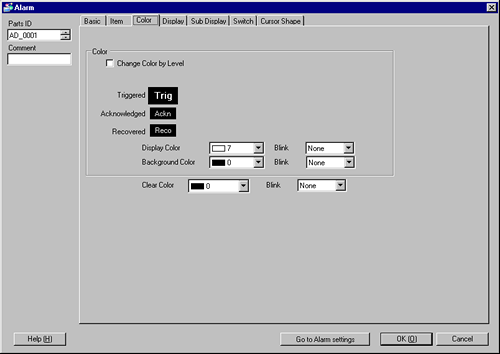
Alarm Messages can be color-coded according to whether they are in the [Trigger], [Acknowledged], or [Recovery] state.
When Alarm Messages have levels attached during the registration, the levels can also be color-coded.
Color
Configure color settings to correspond to the states of Alarm Messages (Trigger, Acknowledged, and Recovery).
Change Color By Level
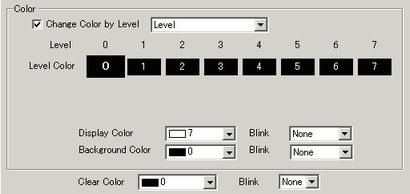
Select this to color code the various Alarm Messages by their attached level set in [Alarm]. Choose the color-coding criteria from [Level] or [State+Level].
Level
Display the color based on the level (8 levels from 0 to 7) set in the [Block] in [Alarm].
State+Level
Display the color based on the level (8 levels from 0 to 7) set in the [Block] in [Alarm], and divide each level into colors based on the state [Trigger], [Acknowledged], and [Recovery].
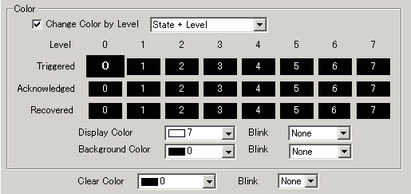
Trigger/Acknowledged/Recovery
Specify the state to set a color.

When a recovered alarm message is acknowledged, the message is displayed in the color specified to the recovery state.
Display Color
Select a color for the Alarm Message text.
Background Color
Select a background color for the Alarm Message.
Clear Color
Select a color used when an Alarm Message is cleared or not displayed.
Blink
Select the blink and blink speed. You can choose different blink settings for [Display Color], [Background Color], and [Clear Color] respectively.
Depending on your display unit's model and [Color] settings, you may not be able to set Blink (from the [Project] menu, point to [System Settings] and click [Display Unit]).
 1.6 Supported Colors