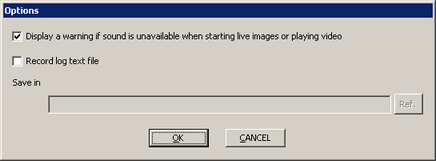
From the [Tool] menu, select [Options] to display the [Options] dialog box. In the [Options] dialog box, you can confirm and change Camera-Viewer EX settings.
These settings are shared between all instances of Camera-Viewer EX on the computer.
Display a warning if sound is unavailable when starting live images or playing video
Select this check box to display a warning message if the sound card or driver is not properly installed when you start the live video display or playback a video file. When the warning message appears, there will be no sound for live image or video playback.
Record log text file
Select this check box to output the [Media information] dialog box's log to a text file.
For information about log files, see the following.
 4.12 Log File
Save in
Defines the location of the log file.

Including the file name, you can enter up to 255 single-byte characters.
Ref.
In the [Browse For Folder] dialog box, select the location of the log file.