Turn ON D10 bit 0. All the filing data recipes stored in internal memory are transferred to backup SRAM.

When saving the recipes to the CF Card, turn ON bits 0 and 8. When saving the recipes to the USB storage device, turn ON bits 0 and 9.
When the transfer to backup SRAM has been completed successfully, turn ON the Write Completed Bit (M100). After confirming the bit is ON, turn OFF D10 bit 0 and M100.
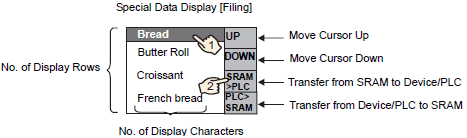
In the Special Data Display [Filing] on the screen of the display unit, the item names of registered blocks in the files specified in the backup SRAM (File#0) display in a list.
Touch the recipe you want to transfer. (You can select multiple files from the displayed list.)
Touch the backup SRAM to Device/PLC transfer switch.
The selected recipes transfer to the device/PLC.