This function is operational when using the IPC Series or SP5000 Open Box (SP-5B40).
Summary
Runs the specified range and start the application.
You can specify settings such as the startup parameters and the watch on multiplex start.
Format
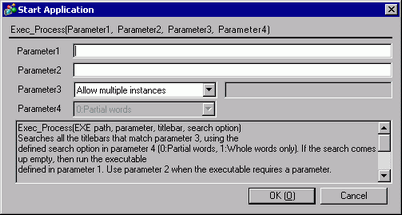
Exec_Process (Parameter 1, Parameter 2, Parameter 3, Parameter 4)
Parameter 1
EXE path: Input the absolute path of the executable file (.exe) for the application you want to start. You can input up to 255 characters.
Parameter 2
Parameter: Input the startup argument of the executable file. You can input up to 255 characters.
Parameter 3
If you do not want to allow multiple instances, select "Do not allow multiple instances" and input the [Window Title]. You can input up to 63 characters.
The application cannot start if another window with the same title as [Window Title] is found.
Multiple instances are allowed if you select [Allow multiple instances] or if [Window Title] is not specified.
Parameter 4
Find whole window titles only: Enabled only when you select in Parameter3 - "Do not allow multiple instances".
0 : When "0: Partial Words" is selected, the specified application is not executed if a window is found with a title partially the same as that in [Window Title]. When "1: Whole Words Only" is selected, the specified application is not executed if a window is found with a title completely the same as that in [Window Title].

Parameter1 requires text (EXE path). An error occurs when you do not input text.
Parameter 1 (EXE path) input method
There are 3 ways to input the EXE path:
The following description gives an example of executing sample.exe in C:\Documents and Settings\user\Local Settings\Temp.
Full path
For example, C:\Documents and Settings\user\Local Settings\Temp\sample.exe
EXE only
If the executable file is in a folder specified as the path in the Environment Settings on an IPC Series
For example, sample.exe
(Run when Path=C:\Documents and Settings\user\Local Settings\Temp)
Define using environment variable
If the executable file is in a folder specified as an environment variable in the Environment Settings on an IPC Series
For example, %TEMP%\sample.exe
(Run when environment variable is TEMP=C:\Documents and Settings\user\Local Settings\Temp)
Example expression 1:
Allow multiple instances (Start the notepad and display the Readme.txt)
Exec_Process("C:\WINDOWS\SYSTEM32\notepad.exe","D:\TEMP\Readme.txt","",0)
Exec_Process("%SystemFolder%\notepad.exe","D:\TEMP\Readme.txt","",1)
Example expression 2:
Do not allow multiple instances:
Exec_Process("C:\WINDOWS\SYSTEM32\notepad.exe","D:\TEMP\Readme.txt","Readme",0)
Example expression 3:
Do not allow multiple instances: Whole Words Only (Start the notepad and display the Readme.txt)
Exec_Process("C:\WINDOWS\SYSTEM32\notepad.exe","D:\TEMP\Readme.txt","Readme.txt - Notepad",1)
Example expression 4:
Do not allow multiple instances: Partial Words (Start the notepad)
Exec_Process("C:\WINDOWS\SYSTEM32\notepad.exe","","Notepad",0)
Example expression 5:
No parameter (Start the notepad)
Exec_Process("C:\WINDOWS\SYSTEM32\notepad.exe","","",0)
Example expression 6:
Multiple Parameter (Start the sample.exe)
Exec_Process("C:\WINDOWS\SYSTEM32\sample.exe","/v /a/s","",1)