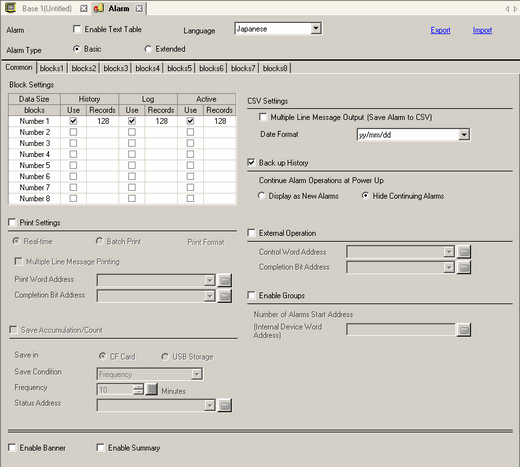

The setting of the text table or language is common to all alarm settings (History, Banner, Summary). When the selection of [Language Setting] is changed to [Enable Text Table] and vice versa, the messages which have been set are deleted.
Enable Text Table
Select this check box to use the text registered in Text Tables as an Alarm Message. The language of alarm messages can be changed while the system is running. 18.7.2.4 Alarm Part - Item/Extended (Text Table)
Using a Text Table, the alarm message can be updated on startup or at any timing by reading it from the external memory without transferring the project data. Please refer to the Settings Guide for details.18.6 Changing Text Table Without Transferring
From the [Common Settings] menu's [Text Table] command, in the [Alarm Type] if you select [Extended], and select the [Expand index count] check box as required.18.7.1 Common [Text Table] Settings Guide
Language
When entering messages without using the Text Table, select the language of the alarm message as [Japanese], [ASCII], [Chinese (Simplified)], [Chinese (Traditional)], [Korean], [Russian (Cyrillic)], or [Thai].
Export
Outputs the settings in CSV format.20.16 Alarm History Import/Export
Import
Load the settings created in CSV format.20.16 Alarm History Import/Export
Alarm Type
Choose from [Basic] or [Extended].
If you select [Extended], you can increase the number of alarm messages according to the following table. Also, you can set the [Retentive Accumulation/Count] settings, [Number of Units] and [Polling Frequency] settings by each block.
Number of messages registered
Display Unit |
Basic |
Expand |
IPC Series |
10000 |
65533 |
SP5000 Series*1 GP4000 Series |
2048 *2 |
65533 |
Other Models |
2048 *2 |
32767 |
*1 When using the SP5000 Series Open Box (SP-5B40), you can register the same number of records as the IPC Series by selecting [Folder] in System Settings - [Display Unit] - [WinGP] - [Historical Data Retentive Settings] - [Save in].
*2 You can register up to 2048 alarm messages, including [Bit Monitoring] and [Word Monitoring] for the whole Alarm History (Block 1 to 8). For [Word Monitoring], you can register up to 768 alarm messages.
Records
Display Unit |
Basic |
Expand |
IPC Series |
10000 |
10000 |
SP5000 Series*1 GP4000 Series |
768 |
2048 |
Other Models |
768 |
768 |
*1 When using the SP5000 Series Open Box (SP-5B40), you can add to memory the same number of records as the IPC Series by selecting [Folder] in System Settings [Display Unit] - [WinGP Settings] - [Historical Data Retentive Settings] - [Save in].
Depending on the mode, the number of alarm messages cannot be expanded. For information on compatible models, see the following.1.5 Supported Features
To use the [Extended] setting for GP3000 series, attach a GP3000 Function Expansion Memory (option). On the [System Settings] window, select [Display Unit]. In the [Extended Settings] tab, set [Function Expansion Memory] to [8M].
For details about the [Retentive Accumulation/Count] settings, please see the following.20.12.1.1 Alarm Guide
See the following for the [Number of Units] and [Polling Frequency]. 20.12.1.2 Alarm Settings (Block 1) - Bit Monitoring
If the number of Monitoring Addresses is large, the display update may be delayed.